


Tilt: Cash Advance & Credit
4.6108.19K Reviews
App Specs
- Version
- 7.62.0.847
- Updated On
- License
- Free
- Downloads
- 5,000,000+
- Developer
- Tilt Finance
- Categories
- Finance
- Platform
- Android, iOS
Screenshots



 Analysis by AppCompare
I tend to judge money apps by what they help me decide, not by how many financial tools they place on a screen. Tilt: Cash Advance & Credit brings short-term cash options together with credit-related tools, score monitoring, saving and budgeting. That combination makes it worth a look if you want a single starting point for managing a tight month, though it is not a replacement for a careful budget or a long-term plan for debt.
A finance app built around short-term needs
Tilt is a free finance app from Tilt Finance. It has been available since December 4, 2017, and version 7.20.0.784 is its current version. Its 4.7 average comes from around 278,000 ratings, while more than 5 million installs suggest that it has reached a broad audience. Those numbers help establish that the app is widely used, but they do not tell me whether a particular advance or credit option will suit your circumstances. I would treat the app as a place to explore choices, then read the terms for any product before acting.
The app is rated for Everyone, but that age label should not be confused with a promise that every financial feature is available or appropriate to every user. Eligibility and product terms matter more than the broad content rating. I would also keep expectations grounded: an app can make financial information easier to view, but it cannot make a costly borrowing decision harmless or guarantee a change in a credit score.
Where it fits in a real monthly routine
Imagine a bill arrives a few days before payday while your checking balance is already spoken for. Tilt’s appeal is that you can look at a cash advance option and your broader credit or budgeting picture in the same app, rather than switching between a lender, a credit-monitoring service and a separate money tracker. I see that as most useful for pausing to compare choices: check the amount you actually need, consider the repayment impact, and see whether adjusting the month’s spending is a better answer than borrowing.
That last step is important. An advance can bridge a timing gap, but relying on it repeatedly can turn a one-off shortage into a cycle where the next paycheck is partly committed before it arrives. I would use Tilt to make the trade-off visible, not as a reason to treat available credit as extra income. If the problem is recurring, a budget review or a conversation with a qualified financial adviser may be more useful than another short-term advance.
How its mix compares with familiar alternatives
Many finance apps concentrate on one job: a bank app shows account activity, a standalone budgeting tool organizes spending, and a credit service focuses on score information. Tilt’s broader mix may save time if you want to explore cash access and credit-related tools side by side. The trade-off is that an all-in-one app may not be as specialized as a dedicated budget tracker or as comprehensive as your bank’s own account view. I would keep using primary bank records to verify balances and transactions, especially before making a repayment decision.
It can also help to decide what you want from the app before signing up. If you mainly need to understand where your money goes, start with budgeting and saving tools rather than an advance. If you are checking your credit, use score monitoring as a way to follow information over time, not as a promise that the score will move quickly. And if you already have a low-cost option through your bank or an emergency fund, compare that with any borrowing choice before accepting an offer.
Worth Reading Before You Choose

EA SPORTS FC Mobile 26 Is a Bigger Football Game, but It Takes Time

Flipboard Shows What News Apps Must Do Beyond the Feed

Switching to Android Auto Means Rethinking Your Driving Routine

Google Calendar Makes a Crowded Week Easier to Manage

Ludo King Makes the Most of the Minutes Between Plans

Baby Panda World Brings Quick Play to Modern Phones, but Its Game Library Feels Busy
Getting Started with Tilt
First things first, setting up Tilt is a breeze. You download the app, sign up, and connect your bank account. The user interface is clean and intuitive, making it easy to find your way around. I didn’t have to hunt for anything—which is always a big plus in my book!
Connecting an account is a practical convenience, but it is also a moment to slow down and check what access you are authorizing. I would review the connection prompts and any account permissions carefully, then decide whether the features I plan to use justify linking a bank account. If you prefer not to connect accounts to a separate finance app, that preference may outweigh the convenience of seeing tools together. You can still think through the app’s intended role before you commit to using it.
Features That Stand Out
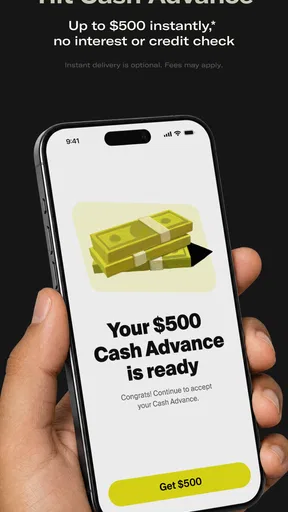
What sets Tilt apart from the crowd is its cash advance feature. If you need some quick cash to tide you over, you can request an advance without the hassle of credit checks. Just a few taps, and you’re good to go. It's almost like having a friend who's always got your back when times get tight.
I would still approach an advance as borrowing, not as a casual tap in a convenient interface. Before requesting one, work out the smallest amount that solves the immediate problem and consider what your next pay period will look like after repayment. For a one-time timing mismatch, that calculation can make the decision clearer. If the numbers only work by taking another advance later, I would treat that as a sign to look for a different solution.
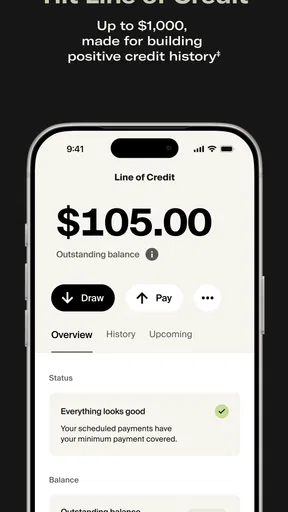
Then there’s the credit building aspect. Tilt offers tools to help you improve your credit score, which is a nice touch. You can track your progress right from the app. It's a nifty feature for anyone looking to boost their financial standing without jumping through hoops.
For credit monitoring to be useful, I find it helps to check trends rather than react to every small change. Make a note of what you are trying to improve, review the information periodically, and pair the app’s view with habits you can control, such as keeping bills organized and avoiding borrowing you cannot comfortably repay. A score is one measure, not a complete picture of financial health, so I would not use it as the sole basis for taking on a new credit product.
Saving and budgeting without losing sight of the basics
The app’s saving and budgeting tools give it a role beyond emergency cash and credit monitoring. I would use budgeting to map out fixed bills first, then look at flexible spending and the amount left for saving. That order makes a practical difference: it prevents an optimistic savings target from ignoring expenses that are due soon. If you are new to budgeting, a simple monthly plan you can maintain is more useful than trying to categorize every purchase perfectly from day one.
A useful workflow is to review the week before payday, identify upcoming bills, and set aside money for essentials before deciding what is available for discretionary spending. Then, if a shortfall appears, you can distinguish a temporary timing problem from a budget that is consistently short. Tilt’s combination of tools may make that review more convenient, but I would still check the underlying bank balance and scheduled payments directly. That small verification step can prevent a plan from relying on a balance that has not yet accounted for a pending transaction.
Security and Support
When it comes to handling money, security is a top priority. Tilt uses encryption to keep your data safe, which gave me peace of mind while using the app. Plus, they offer responsive customer support. I reached out with a question, and they got back to me in no time. It’s always reassuring to know help is just a message away.
Even with encryption, I would use the same care I apply to any app connected to financial information: choose a strong, unique password, protect access to the phone itself, and avoid handling sensitive account questions on a shared device. If something in the app does not match what you see at your bank, verify the bank’s records before making a financial decision. For questions about an advance or credit product, I would ask support to clarify the specific terms rather than assume that a general explanation covers my situation.
Who is likely to get the most from it
I think Tilt is best suited to someone who wants a convenient place to check several parts of a personal-finance routine and who is comfortable reviewing borrowing terms carefully. It may be especially useful when you are trying to build better habits around monitoring, spending and saving, while keeping an occasional cash shortfall in perspective. The broad set of tools is less compelling if you only want a basic transaction list or already have a budgeting system that works well.
I would skip the borrowing side if you are looking for free money, need a guaranteed approval, or cannot identify a realistic way to handle repayment. I would also consider a bank’s own app first if your priority is simply seeing accurate account activity, and a dedicated budgeting service if detailed spending analysis matters more than credit or cash access. Tilt’s value is the combination, not a reason to stop comparing alternatives.
What I would check before relying on it
Before using any cash or credit feature, I would look for the amount offered, the repayment schedule, all applicable costs and what happens if repayment is late. Those details determine whether a convenient option is actually manageable. I would also check whether the specific tool is available to me and whether its terms fit my income timing. A clean interface can make a decision feel easy, but the useful comparison is the total obligation against the alternatives, including waiting, changing a spending plan or asking a biller about timing.
Another practical question is whether the app’s view is enough for the task at hand. For a quick check-in, a combined dashboard can be handy. For a disputed transaction, an important payment or a full review of your finances, I would go to the bank or the relevant provider directly and keep a record of the details. That division of labor lets Tilt serve as a planning tool without making it the only source you trust.
Security and Support
When it comes to handling money, security is a top priority. Tilt uses encryption to keep your data safe, which gave me peace of mind while using the app. Plus, they offer responsive customer support. I reached out with a question, and they got back to me in no time. It’s always reassuring to know help is just a message away.
What to watch as the app evolves
The current version number shows that Tilt has continued through multiple releases since its 2017 launch, but a version number alone does not tell me exactly which features changed or how each release affected existing users. I would separate that confirmed product history from any expectation about what might come next. If you already use the app, check the release notes when updating and revisit settings or terms that matter to you rather than assuming a familiar screen means every detail is unchanged.
For a new user, the most useful things to watch are straightforward: whether the tools you need are available in your account, whether the borrowing terms are clear, and whether the budgeting and monitoring views help you make decisions you can act on. If those pieces work for your situation, the all-in-one approach can be convenient. If you find yourself opening it mainly to seek another advance, that is a good cue to step back and address the underlying cash-flow problem instead.
Final Thoughts
Overall, Tilt: Cash Advance & Credit is a solid choice if you’re looking for a quick financial fix or aiming to build your credit. It's user-friendly and designed to make life easier, which is something we could all use a bit more of, right?
I would recommend it most to someone who wants cash access and credit-related tools alongside basic money-management features, and who is willing to compare terms before borrowing. Its convenience is real, but convenience should make careful choices easier, not replace them. If your needs are narrower, your bank’s app or a focused budgeting tool may be a better fit; if you want to explore several finance tasks in one place, Tilt is a reasonable app to consider.
If you’re curious to try it out, you can find Tilt available on both Android and iOS. Give it a whirl and see if it becomes your go-to financial sidekick. Until next time, happy app exploring!
Pros
- Fast approval process for cash advances.
- User-friendly interface with clear navigation.
- No hidden fees or surprise charges.
- Accessible customer support via chat.
- Flexible repayment options available.
Cons
- Limited to certain regions and users.
- Requires access to sensitive personal data.
- High interest rates on advances.
- Not compatible with older devices.
- Occasional app crashes reported.
FAQs for Tilt: Cash Advance & Credit
What is Tilt: Cash Advance & Credit?
Tilt: Cash Advance & Credit is a financial app designed to provide users with quick access to cash advances and credit options. It aims to help users manage their finances by offering a seamless and user-friendly experience, ensuring funds are easily accessible whenever needed. The app is available for both Android and iOS devices.
How does Tilt ensure the security of my financial information?
Tilt uses advanced encryption and security protocols to protect your financial data. The app complies with industry standards to safeguard your personal and banking information, ensuring that all transactions and data exchanges are secure and private. Regular updates are also implemented to address any potential security vulnerabilities.
Are there any fees associated with using Tilt?
While Tilt offers cash advances and credit options, users should be aware of potential fees involved. These can include service fees or interest rates on borrowed amounts. It's essential to review the terms and conditions within the app to understand any costs fully, ensuring there are no surprises when using the services.
What are the eligibility requirements to use Tilt?
To use Tilt, you generally need to be at least 18 years old and have a valid bank account. The app may also require a steady income source and a credit check to determine eligibility for certain services. Users can find detailed eligibility criteria on the app's website or within the app itself.
How quickly can I access funds through Tilt?
Tilt is designed to offer quick access to funds, often providing cash advances within minutes of approval. However, the exact timing can vary based on banking processes and the time of day the request is made. Users should check the app for specific details on processing times and any factors that might affect the speed of fund delivery.


